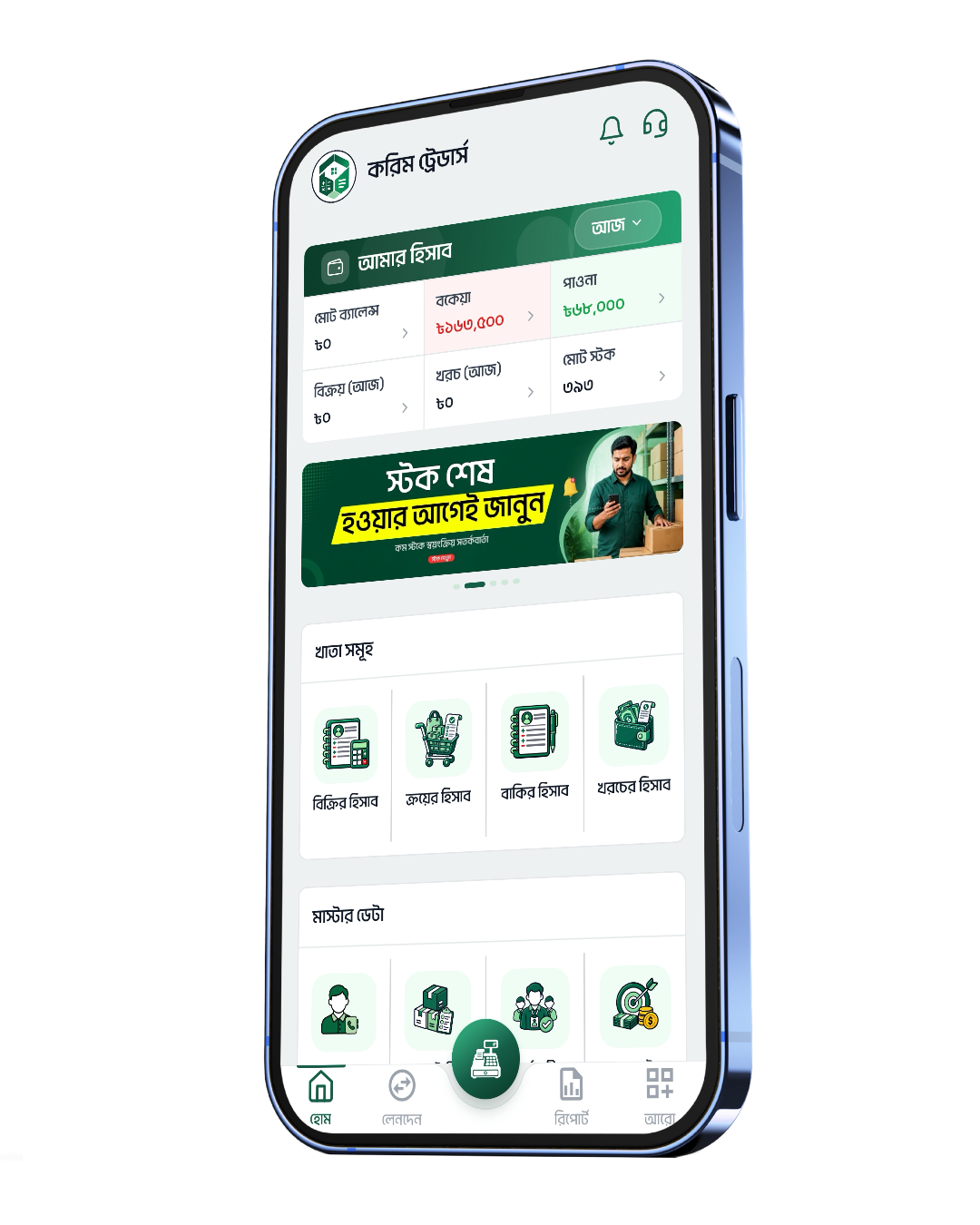
Every account a shop needs, in one app
Each feature sits next to its real app screen — see exactly what you will get.

Stop losing money to forgotten credit
Most of a shop's money is stuck in credit. Names written in a notebook get lost, and reminding customers again and again is awkward. HisabiGhor keeps a separate ledger for every customer — what they took, what they paid, and how many days it has been. The app sends the reminder for you by SMS or WhatsApp.
- Two sides kept apart — money you will receive and money you owe
- Customer credit and supplier credit in separate lists
- A dated ledger for every account — what was taken, what was paid
- Days outstanding — the app counts them for you
- Record a part-payment and the balance updates itself
- SMS reminders with your own template: {name} {amount} {date} {shop}
- WhatsApp reminders, or one tap to call
- Credit statement as a PDF to send to the customer
- Full history with filters
Record a sale in ten seconds
At rush hour there is no time to write in a notebook. Pick items or scan a barcode, enter quantity — the app adds it up. If the customer pays only part, the rest goes into the credit ledger on its own. No product list yet? Use Quick Sale and just record the amount.
- New sale — add to cart → quantity → discount → delivery charge → total
- Quick sale — just the amount, no product needed
- Scan a barcode to add an item
- Pick a customer, or use "walk-in customer"
- Tag which staff member made the sale
- Cash, bKash, Rocket, Nagad, Upay, bank or cheque
- Part-payment? The balance goes to the credit ledger automatically
- Attach a photo of the bill or receipt
- View, print, share or SMS the receipt
- Stock goes down the moment you sell

Your whole shop on one screen
No more counting the cash drawer to know how the day went. The home screen shows total balance, what you owe, what you are owed, today's sales, spending and total stock — together. Every ledger sits below it, one tap away.
- Today's sales, spending and profit at a glance
- Cash-flow chart — day, week, month, year or a custom range
- Total balance, transactions, stock and purchase value
- Recent transactions
- Quick actions — new sale, quick sale, invoice, credit
- All ledgers — sales, purchases, expenses, credit, stock, bank, cash box
- Search customers or products
- Alerts — dues, low stock, budget, expiring items, warranty
- Business notes, just for you











Swap the handwritten memo for a real invoice
Bigger customers and companies expect a clean bill. Pick the customer and items and the invoice is ready — discount, VAT and total are worked out for you. Add your logo and signature and send it as a PDF.
- Customer details, items, prices and quantities
- Subtotal, discount, VAT/tax and grand total
- Payment status — paid, partial or due
- Due date
- Invoice themes — several designs, your colour, your logo
- Digital signature — draw it with your finger, pick the ink colour
- Your own invoice prefix and watermark
- Download PDF, print, share on WhatsApp or email
- Edit invoices and see the full history

Know before the shelf goes empty
A customer asks, and the shelf is empty — that is the costliest moment in a shop. Set a minimum stock for each item and the app warns you when it drops below. Stock moves with every purchase and sale, so there is nothing to count by hand.
- Name, up to 5 photos, category and sub-category
- Purchase, retail and wholesale price, discount %
- Units — piece, kg, gram, litre, dozen, packet, carton, foot, inch, km
- Current and minimum stock — alert when it runs low
- Scan and generate barcodes / QR codes
- Warranty tracking and expiry alerts
- Take product photos with the camera
- Sort and filter by name, price or low stock
- Total stock value and cost

Every stock purchase, in one place
If purchases are not recorded properly, profit never adds up. Record each purchase — supplier, invoice no., batch no., what you paid and what you still owe. Stock goes up automatically.
- New purchase — pick a supplier or add a new one
- Purchase no., invoice no., batch no., unit price, quantity
- Payment status — paid, partial or due
- Purchase receipt as PDF, print or share
- Purchase report
- Stock goes up automatically

A page for every customer
Regular customers are a shop's real capital. Every customer's name, phone, address and full purchase history sits in one place. Import them from your phone contacts — no retyping.
- Customer profile — name, phone, address (division → district → upazila → area)
- Import directly from your phone contacts
- Purchase history and total due for every customer
- Supplier list with what you owe each
- One tap to call, SMS or WhatsApp

Your staff use it. You stay in control.
Many owners do everything themselves because handing the app to staff means handing over every number. In HisabiGhor each staff member logs in with their own phone number, and you decide what they can see and do. The cashier records sales — and never sees your profit.
- Staff profile — name, role, phone, NID, address, photo
- Daily attendance — present, absent, leave, sick
- Monthly attendance report and attendance rate
- Salary slip — working days, pay calculation, PDF and print, signed
- Staff login — their own phone number, their own login
- Access control — transactions, customer list, stock, staff info, settings
- Quick presets by role — cashier, delivery, helper

Finally see where the money goes
Small expenses become a big number by month end, and nobody knows where it went. Record each one with a category and the app shows you where most of it is going.
- Expense categories — create your own, pick an icon
- Today's, this week's and this month's spending
- Breakdown by category
- History with filters
- Other income and other expenses kept separate

Profit or loss — know it, don't guess it
More cash in the drawer does not mean profit — credit may have grown, or you bought less stock. HisabiGhor subtracts cost from selling price to show real profit, plus which items sell best and which sit on the shelf.
- Income and expense report, profit and loss (price − cost)
- Sales, purchase and staff reports
- Weekly, monthly and yearly charts
- Income by source
- Best sellers and slow movers
- Financial year setting (e.g. July–June)
- Export every report to PDF and Excel

An assistant who reads your numbers
Reports take time, and not every chart is easy to read. Ask the AI assistant a plain question in Bangla — it looks at your shop's numbers and tells you what is selling and where you are losing money.
- Advice based on your own business data
- What is selling, and where you are losing money
- Ask in Bangla, get answers in Bangla
No separate calculator needed
Monthly instalments, price with VAT — these come up many times a day. Every calculator is built into HisabiGhor, in Bangla digits.
- Standard calculator — in Bangla digits
- EMI calculator — instalments
- Interest calculator
- Tax calculator — inclusive and exclusive

Small things that make a big difference
Budgets
Set a monthly budget — get warned at 80%.
Reminders
For collecting dues, payments or any task.
Bank & cash box
Several bank accounts and cash boxes, kept apart.
Recycle bin
Deleted something by mistake? Bring it back.
Offline mode
Everything works offline — it syncs when the internet is back.
Backup & restore
Lose the phone, not the accounts.
Shop profile
Name, logo, address, TIN, invoice prefix.
Dark theme
Easier on the eyes at night.
Bangla + English
The whole app in Bangla, or English if you prefer.
In-app tutorial
Step-by-step guidance inside the app.
SMS credit
Buy an SMS pack to send credit reminders.
Delete account
Your right to erase your own data.
Start today — 1 month free
Log in with your mobile number, name your shop — and record your first sale within five minutes.
- No card needed
- Works offline
- Your data is never deleted